


GameBase-style library frontend
Browse imported collections in windowed mode or fullscreen BigBox mode.
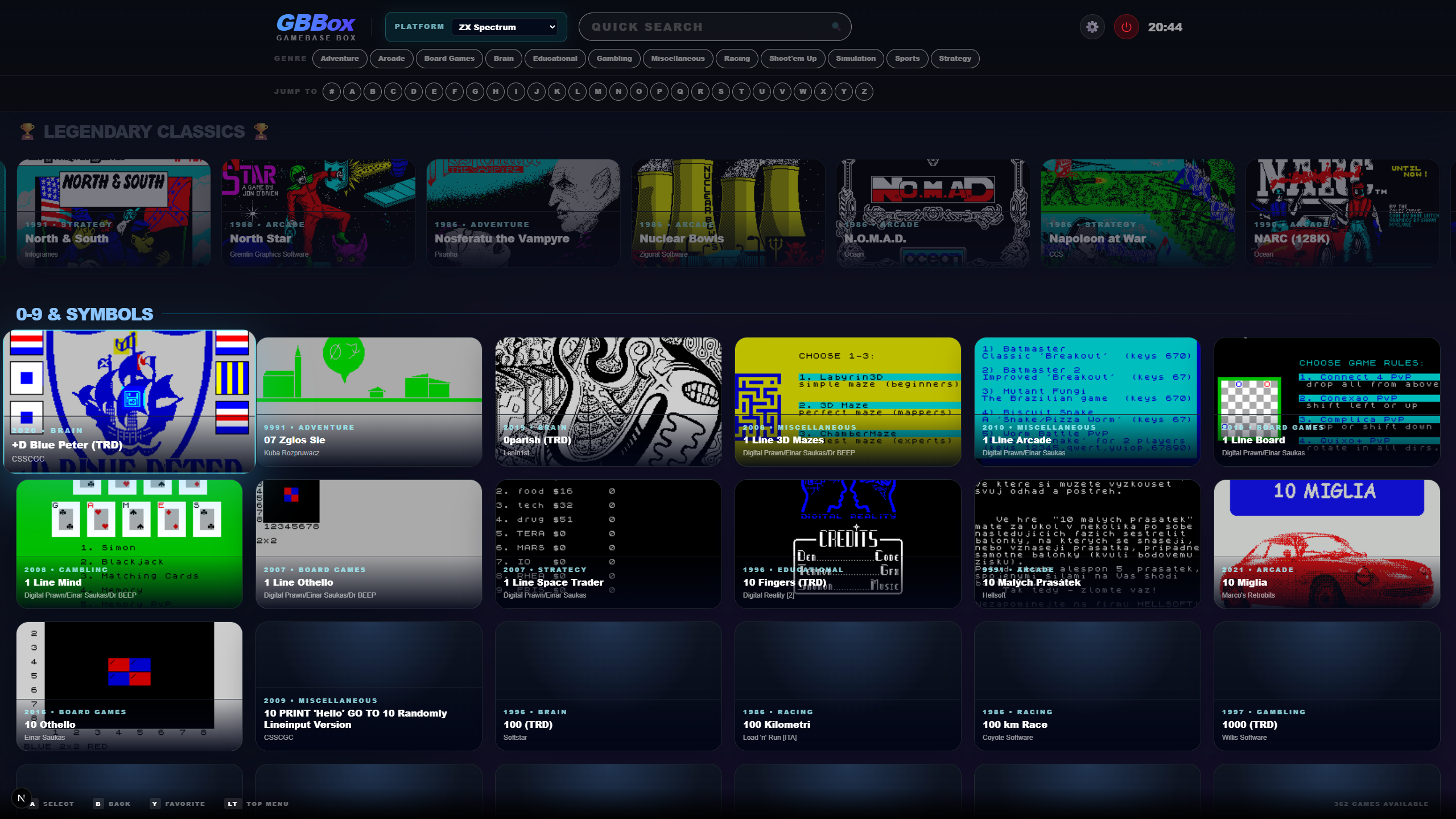
GameBase Box is a local-first desktop frontend for GameBase-style retro game libraries. It started life as 64Box for the GameBase64 collection and now supports platform-scoped imports for Commodore 64, Commodore 128, Commodore VIC-20, Commodore PET, Commodore Amiga, Atari 800, Atari 2600, Atari 5200, Atari 7800, Atari ST, ZX Spectrum, Acorn BBC Micro, Amstrad CPC, and Apple 2GS.
Formerly 64Box. The public repository is GameBaseBox on GitHub.
Latest release builds
Download the latest GBBox build from the platform links below, or browse the full GitHub Releases page.
Platform-scoped libraries
| Platform | Status | Notes |
|---|---|---|
| Commodore 64 / GameBase64 | Supported | Compatibility baseline with VICE, RetroArch, SID playback, extras, screenshots, and GameBase64 metadata. |
| Commodore 128 | Supported | Imports GameBase C128 MDBs with Extras, Games, Screenshots, Musician Photos, and SID music folders. VICE x128 and RetroArch support. |
| Atari 800 | Supported | Imports Atari 800 v12-compatible GameBase MDBs with Games, Music, Photos, Screenshots, and Extras folders. Supports RetroArch Atari800 and Altirra launch settings. |
| Atari 2600 | Supported | Imports Atari 2600 GameBase MDBs with Games, Screenshots, and Extras folders. Uses RetroArch/Stella-style launch settings. |
| Atari 5200 | Supported | Imports Atari 5200 GameBase MDBs with Extras, Games, Screenshots, and Photos folders. Altirra and RetroArch desktop profiles. |
| Atari 7800 | Supported | Imports Atari 7800 GameBase MDBs with Extras, Games, and Screenshots folders. RetroArch ProSystem desktop profile. |
| Atari ST | Supported | Imports Atari ST GameBase MDBs with Extras, Games, Screenshots, and Music folders. RetroArch, STeem, and Hatari support. |
| ZX Spectrum / GameBaseZX / SpeccyMania | Supported | Imports Sinclair ZX Spectrum v6-compatible GameBase MDBs with Extras, Games, Screenshots, Musician Photos, and Music folders. RetroArch is the default launch profile, with Spectaculator as an external emulator option. .ay music files are recognized as ZX Spectrum music media. |
| Acorn BBC Micro | Supported | Imports BBC Micro GameBase MDBs with Extras, Games, Screenshots, and Music folders. RetroArch is the default launch profile, with BeebEm as the external emulator option. |
| Commodore Amiga | Supported | Imports Amiga GameBase MDBs with Extras, Games, Screenshots, and Music folders. RetroArch is the default launch profile, with WinUAE on Windows and UAE-style equivalents such as FS-UAE or Amiberry on Linux/macOS. |
| Commodore VIC-20 | Supported | Imports VIC-20 v4.0+ GameBase MDBs with Extras, Games, Screenshots, and Music folders. RetroArch and VICE VIC-20 support. |
| Amstrad CPC / AmstradMania | Supported | Imports Amstrad CPC (AmstradMania v7+) GameBase MDBs with Extras, Games, Screenshots, Photos, and AY music folders. Caprice32 / CPC++ and RetroArch support. |
| Apple 2GS | Supported | Imports Apple 2GS GameBase MDBs with Extras, Games, Screenshots, Photos, and Music folders. Full KEGS and RetroArch (MAME core) support with automated GS/OS boot disk mounting and natural multi-disk sequencing. |
| Commodore PET | Supported | Imports Commodore PET (v3.1+) GameBase MDBs with Extras, Games, and Screenshots folders. VICE xpet and RetroArch support. |
GameBase database (.mdb) files, ROMs, screenshots, music, extras, and other media are not included. You point GBBox at the databases and local folders you own.
Built for large retro libraries
Browse imported collections in windowed mode or fullscreen BigBox mode.
Keep catalog data, media roots, emulator paths, favorites, and navigation state separate per platform.
Fully translated across 33 languages including all 24 EU official languages, Turkish, Arabic (with RTL layout), Japanese, Chinese, and Korean.
Search by title and metadata, browse by genre/subgenre, and jump alphabetically through large collections.
Launch through VICE, RetroArch, Altirra, KEGS, and platform-specific emulator profiles where supported.
Play supported Commodore 64 games through the bundled EmulatorJS/VICE core.
Generate temporary .vfl, .m3u, or .cmd launch artifacts for multi-disk games and automated OS boot disk mounting.
Choose from carefully crafted visual themes that carry through the windowed library and fullscreen BigBox experience.
View screenshots, box art, photos, manuals, maps, adverts, books, and other extras from local folders, with video playback when available.
README image gallery
Controller and keyboard
D-pad or Left Stick moves focus, A opens the focused game, B goes back or closes the current panel, X toggles Grid/List view, Y toggles favorite on the focused game, LB / RB jump by letter, and Start opens Settings.D-pad or Left Stick moves through header rows, rails, and tiles, A activates the focused item, B goes back or exits the search field, Y toggles favorite on the focused game, LB / RB move between sections, and Start opens Settings.D-pad or Left Stick moves between play buttons, gallery items, tabs, music player, and favorite button, A activates the focused item, B goes back, Y toggles favorite, and LB / RB switch tabs or media sections.D-pad or Left Stick navigates, A selects, LB / RB switch settings tabs, and B or Start saves and closes.Arrow keys move focus, Enter opens the focused game, F toggles favorite, Shift+F opens Filters, V toggles Grid/List view, S opens Settings, PageUp / PageDown jump by letter, and Alt+Enter toggles fullscreen.Arrow keys navigate header rows, rails, and tiles, Enter activates the focused item, F toggles favorite, and Esc exits the search box or, when pressed twice quickly, exits the app.Arrow keys navigate, Enter or Space activates the focused item, F toggles favorite, Tab / Shift+Tab or PageUp / PageDown or [ / ] switch tabs, and Esc or Backspace goes back.Arrow keys navigate, Enter selects, and Esc saves and closes.